Getting Started
Requirements
- CurrentRanger R3 connected via USB
- macOS, Windows, or Linux
Installation
Download the latest release from the Releases page.
macOS
The app is not yet signed with an Apple Developer certificate. After copying to Applications, remove the quarantine flag:
xattr -cr /Applications/CurrentRanger.app
If macOS still shows a warning, right-click the app and select Open, then click Open in the dialog.
First Launch
- Connect your CurrentRanger R3 via USB
- Launch the application
- The app will automatically detect and select the CurrentRanger serial port
- Click Connect in the left panel
- The device will automatically enable USB logging and begin streaming data
Interface Overview
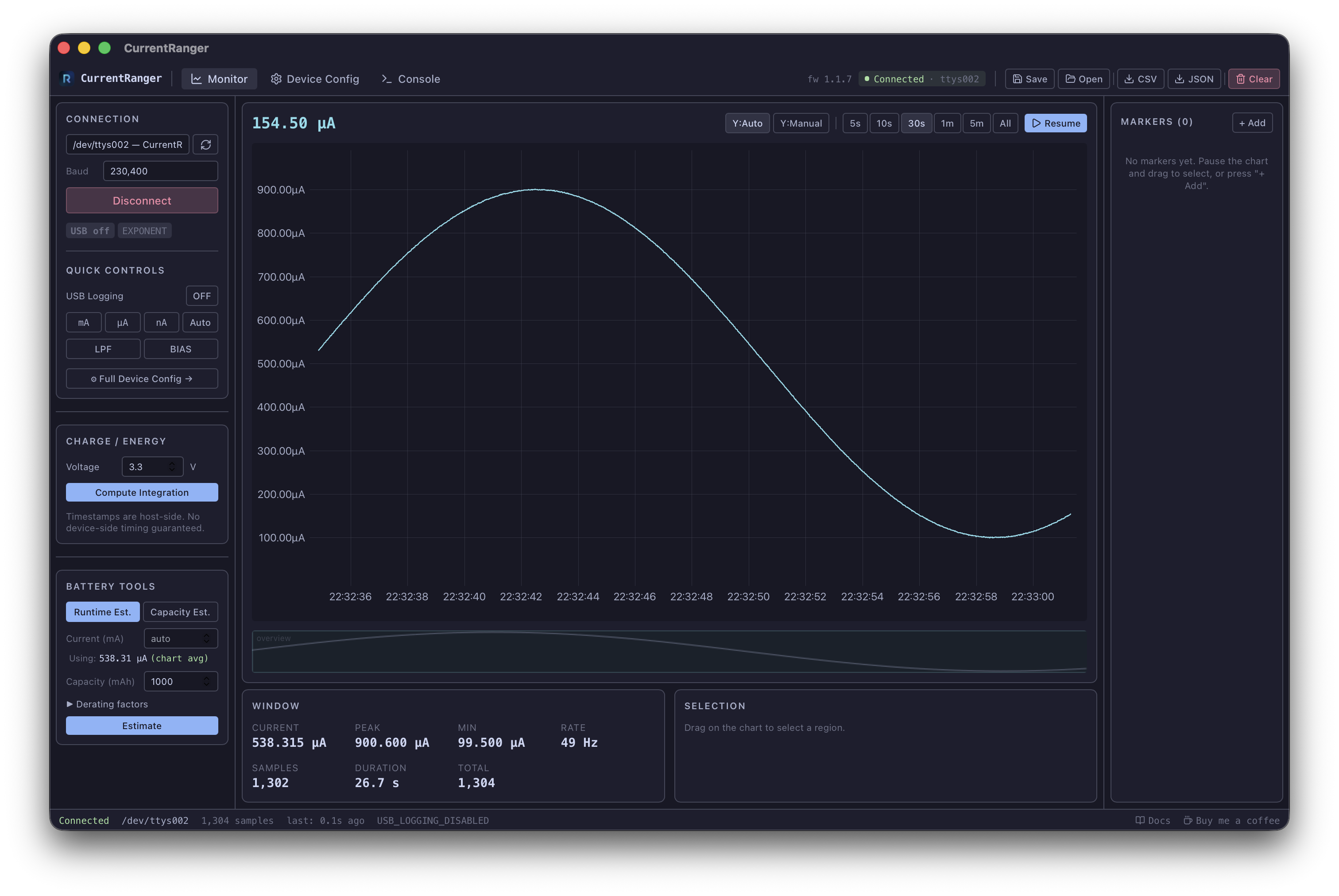
| Area | Description |
|---|---|
| Top bar | Navigation (Monitor / Device Config / Console), connection status, workspace actions |
| Left sidebar | Connection panel, Charge/Energy integration, Battery tools |
| Center | Live chart with toolbar (Y-axis, time window, pause/resume) |
| Bottom center | Window stats and Selection stats |
| Minimap | Overview of all data below the chart, click to navigate |
| Right sidebar | Markers panel |
| Status bar | Connection state, sample count, last message, docs and donate links |